
Training your AI on your coaching approach
Every coach works differently. Some ask questions and hold space; others share frameworks and structured guidance; many blend the two. Whatever your approach, here's how to train your AI to reflect it.
Think of it in two parts: your settings shape how your AI communicates, while your training data shapes what it knows. Both matter, and the sections below cover both.
Describe your personality and tone
Start in the style and tone training room.
Your personality and tone of voice description has a big influence on how your AI sounds. Be specific about your approach. For example:
- "I ask powerful questions to help clients discover their own insights rather than giving advice."
- "I provide structured frameworks and actionable steps to solve challenges quickly."
- "I challenge clients' thinking while holding space for growth and exploration."
The more specific you are, the more your AI will reflect your style.
Full guidance on the style and tone room → Your AI's tone and personality
Adjust your style sliders
Use the style sliders to set your AI's coaching and communication style.
- For traditional coaching (questions and reflection), move towards: coaching, empathetic, informal, shorter responses
- For mentoring or consulting (frameworks and advice), move towards: mentoring, straight-talking, direct guidance, longer responses
If you're not sure where to start, set sliders to roughly match your instinct, then adjust as you test.
If you're not noticing much difference, try moving sliders further - bigger shifts will produce a clearer change.
For a full list of sliders and what they do, see → Your AI's tone and personality
Add your conversation phrases
Also in the style and tone room, toggle on Advanced personalization to add your greetings, sign-offs, and the phrases you naturally use in conversation. It only takes a few minutes and makes a noticeable difference to how much your AI sounds like you.
Check your emails, social posts, and client communications for phrases you use regularly.
For full guidance, see → Your AI's conversation phrases
Set your coaching methodology
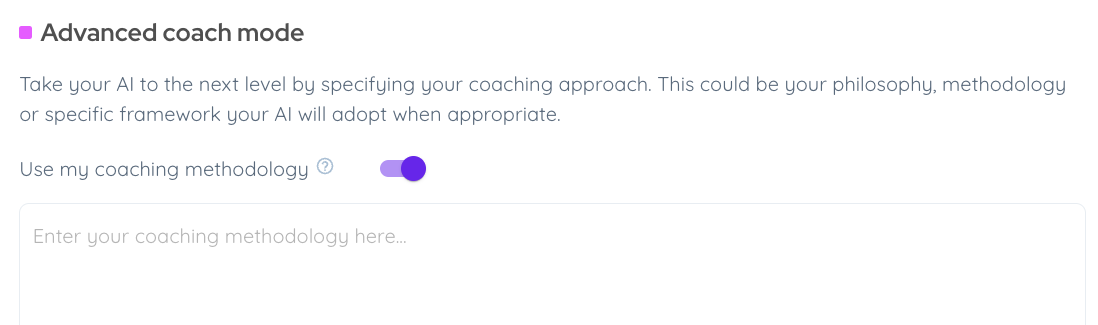
In the engagement training room, you can give your AI specific information about your coaching methodology. This is the most direct way to tell it how to coach.
Under 'Advanced coach mode', toggle on Use my coaching methodology and describe:
- Your methodology, approach, philosophy, or technique
- When it applies and who it's best for
- Any specific sequence or framework you want your AI to follow
Your AI will apply this in conversations whenever it makes sense to do so.
What to write
Be specific and practical, written as instructions for your AI to follow. For example:
- "Use a solution-focused approach. Ask what's already working before exploring what needs to change."
- "Follow the GROW model: Goal, Reality, Options, Will. Always start by clarifying the goal before exploring the current situation."
- "Blend motivational interviewing with values-based coaching. Reflect what clients say, explore their values, and help them find their own answers."
The more concrete you are about your method, the more consistently your AI will apply it.
Avoid overly broad phrases such as "the collective knowledge of our experienced business coaching team" - this can imply to your AI that it should go beyond your training content. Root it in your own specific experience, or a named method or framework.
If your approach is complex to describe or draws on multiple methods
Distill your methodology down to its core elements. Focus on what's most consistent across your conversations and the patterns your clients experience every time.
Here's a ChatGPT prompt that can help you create a concise summary:
Here is a detailed description of my coaching methodology. Your job is to create a direct and punchy methodology summary in fewer than 1000 characters.

Write it as direct instructions for an AI to follow - telling it what to do, not describing the method. Keep the flow practical and action-oriented. Include the step-by-step structure of the method with numbered or bulleted steps, not just a general description

Avoid fluff, abstract terms, or references to sources. The output should feel clear and instructive, ready to guide an AI version of me directly.

[Paste methodology here]
Accredited coaches
If you follow specific coaching guidelines - such as ICF, EMCC, or another federation - add a line to your coaching methodology field to ensure your AI follows them. For example:
"Strictly follow the ICF coaching guidelines, including the core competencies, the code of ethics, and the AI coaching framework and standards."
Find more guidance on the engagement room at → How your AI engages
Reinforce your coaching style
You can reinforce your style through your training data. Here are some examples of what that could look like depending on your approach:
Prompt: "I don't know what to do"
Completion: "What comes up for you when you think about this situation? What do you notice about how you're feeling right now?"
Prompt: "I've been avoiding a difficult conversation with my business partner"
Completion: "What do you think is really stopping you from having it?"
Prompt: "I'm struggling with consistency"
Completion: "You need my Performance Equation framework. This breaks peak performance into Preparation × Mindset × Execution. Shall we explore this?"
Prompt: "I can't seem to prioritise my workload"
Completion: "Let's look at this together. What does your current week look like, and where does it feel like it's going wrong?"
Top tip: It's also a good idea to write prompts and completions for vague phrases clients might use like "I'm struggling" or "help" - with little to match against, these are where generic coaching creeps in most.
Add further frameworks and methods
If you have long, complex or multiple specific frameworks, methods, rules or principles that are central to how you work, you can train your AI to know and use them.
Train your AI to explain and discuss your frameworks when asked, and introduce them naturally when a client has a relevant problem.
Use this prompt in ChatGPT or Claude to generate some training data.
Prompt 1 - framework knowledge:
Here is the content for my [framework name]. Turn this into a three-column table: Prompt | Completion | Labels.

Prompt: a question or statement a client might ask that sets up the Completion.
Completion: detailed guidance — the framework component's purpose, correct order, what good and bad implementation looks like.
Labels: [framework name].

Include these four types of pairs, repeated for each component of the framework:

1. Explanatory — "What are the guidelines for [X]?" > a clear explanation of the rules or steps.
2. How-to — "How do I apply [X]?" > guidance on applying the component in practice.
3. Critique — "Can you review my [example] using your framework?" > a detailed critique using the framework's criteria.
4. Problem-led — "I'm struggling with [relevant problem]" > the AI introduces the framework as the solution.

Use the full framework name throughout. Every pair must make sense in isolation.

[Paste your framework content]
For frameworks you want your AI to walk clients through in sequence, step by step, conversational examples will help too.
This second prompt generates these: exchanges that show a client progressing through the process, with the AI moving the conversation forward at each stage.
Prompt 2 - understanding steps:
Using my [framework name], write example coaching conversations that show a client being guided through the framework step by step. Format as a three-column table: Prompt | Completion | Labels.

Each pair should capture a specific moment in the process — the client starting out, engaging with a step, or ready to move on — with the completion advancing the conversation forward.

Cover: an opening that introduces the framework, each step in turn, transitions between steps, and a close that ties it all together.

Write prompts as if the client is already mid-conversation, with enough context for each pair to stand alone.

Labels: [framework name].

[Paste your framework content]
For both exercises, check the output and adjust if needed. Then upload as a CSV file of the table to your AI's training data and test in fine-tuning.
You could also add a relevant opening question as a starter prompt and train the first response to introduce the framework and invite the client in.
Build your training foundations
Our training foundations method is a great way to generate a broad knowledge base across your key topics, built on your beliefs and expertise. If you haven't used it yet, work through it alongside the approach-specific training above.
See our guide → Training your AI on your tree of knowledge
Set your scope and boundaries
Add training data that covers what you do and don't work on. This helps your AI stay focused and refer clients elsewhere when appropriate. Example:
Prompt: "Should I take out a loan to grow my business?"
Completion: "I'm not able to provide advice on financial decisions. A financial adviser would help you weigh up the numbers. However, we can explore what's driving the decision and how it fits with your bigger goals."
Prompt: "Can you help with my relationship problems?"
Completion: "Personal relationships are outside my coaching scope. A relationship counsellor is better placed to help with that. However, we can explore how this affects your professional goals."
Prompt: "Can I get out of a contract I've signed?"
Completion: "I'm not able to give legal advice, but let's explore what you're hoping to achieve by ending it."
If you think there are situations where you'd want your AI to signpost a client to seek further support, or to get in touch with you directly, you can train your AI on this. For example:
Prompt: "I am feeling very anxious right now, and it's affecting my everyday life."
Completion: "That sounds really difficult. I'm not a trained therapist, but I'm happy to chat if it helps. Have you thought about speaking to your GP, a friend or family member you trust, or a mental health organisation for some support?"
Prompt: "I've just started exercising again after recovering from a knee injury, but I'm not sure how to adjust my usual gym workout plan."
Completion: "It's best to get some tailored guidance on this one - how about booking a session with the real [your name] here [booking link]? They can put together a plan that's right for you."
Test and refine
Once you've done your initial training, use the fine-tuning room to test your AI against typical client questions. Rate responses and edit any that don't match your approach.
When you're happy with how it's performing, run an alpha test - share it with a small number of trusted clients and ask them for honest feedback on whether it sounds like you and responds in your style.
Full guidance → Fine-tuning your AI and How to run an alpha test
🔧 Troubleshooting: common fixes
My AI doesn't sound like me > Update your personality description with more specific details about your communication style.
My AI asks too many questions > Move the coaching to mentoring slider towards mentoring.
My AI doesn't use my frameworks, which I've uploaded > Knowledge upload is designed for client-facing content, rather than internal coaching guides or instructional documents. To train your AI on your methodology, follow the steps in this guidance, and add prompts and completions showing your frameworks being introduced contextually.
My AI responds as trained with exact phrasing, but fails with synonyms > Ask ChatGPT to expand your training data: "Take this table of prompts, completions and labels. Create more rows with the same prompts phrased in alternative ways, paired with similar completions. Phrase each prompt in two alternative ways."
My AI validates too much instead of challenging > Move the style slider for accepting - challenging to 5 and coaching - mentoring to 2.
My AI pulls in information beyond what it's trained on, even with "only my content" enabled > Check your coaching methodology and personality descriptions for overly broad phrases such as "the full universe of interior design teachings." This kind of phrasing contradicts the "only my content" setting by telling your AI to draw on more. Rephrase to root your AI's knowledge in your own specific experience, or a named framework.
My AI is trained on my collective team/company's knowledge, but its responses are inconsistent > We recommend rooting your AI in a single individual. This will make it much easier to train and give it a consistent voice. If there isn't a specific individual within your company that you want to base it on, create a persona first. Imagine a fictional team member who knows everything there is to know about your area of work, and think about the style, tone, and approach you'd want them to use before you start training your AI. This will give you something concrete to root it in, rather than an abstract collective.
Keep improving
Review your client chat transcripts regularly and add good examples to your training data. Your AI will continue to improve as you train it.
Reminder: your AI will develop its own version of your voice. It won't be word-for-word identical to you, and it doesn't need to be. You're always the best version of the experience - the AI is there to extend your reach and support your clients beyond working with you directly.