
Collecting marketing consent
If you serve users in regions governed by GDPR, such as the EU or UK, you may need explicit consent before sending them marketing communications. Coachvox lets you add an optional marketing consent checkbox to your AI sign-up modal.
Why this matters
A privacy policy can explain how you intend to use someone's information, but it does not mean they have actively agreed to receive marketing.
Where consent is required, users must make a clear and positive choice, and the consent should explain who will contact them and what type of marketing communications they may receive.
This feature is primarily intended for creators serving users in the UK, EU/EEA or other regions with similar privacy and electronic marketing rules. There are some exceptions, including certain communications to existing customers and some business contacts. You are responsible for understanding the rules that apply to your business and users.
What the marketing consent option does
When enabled, an unticked marketing consent checkbox appears in your AI sign-up modal. The default wording is:
I'd like to receive marketing emails from [your name].
You can edit this wording as mentioned below.
Once enabled, users can choose whether to tick the box before continuing. They can still sign up and chat with your AI if they leave it unticked.
Important: The consent box can't be pre-ticked, and leaving it unticked never blocks access to your AI. This ensures consent is valid.
Adding a marketing consent checkbox
To add marketing consent to your AI's sign-up modal:
- Go to your AI settings.
- Under Privacy and consent, enable the Marketing consent option.
- Review or edit the automatically populated consent statement.
- Click Save.
A checkbox will now appear when new users sign up to chat with your AI.
Editing the consent statement
You can edit the statement in your AI settings to reflect how your business will contact users.

Your statement should clearly cover:
- The type of marketing they will receive, such as emails, text messages or telephone calls.
- The person or business that will send those communications.
For example:
I'd like to receive marketing emails and text messages from ABC Coaching.
Make sure the wording accurately reflects what you intend to do. If you only mention emails, the consent should not be treated as permission to send marketing through other channels.
Viewing marketing consent
Each user's choice is recorded on your client screen.
- The Opt-in column shows
- ✅ A tick if they agreed to receive marketing
- ❌ An X if they didn't agree to receive marketing
- ➖ A dash if they weren't asked (for example, if they signed up before you enabled this feature)
- The Opt-in date column shows the date and time when their choice was recorded.
If the Opt-in and Opt-in date columns are not showing, hover over any column heading > click the three dots > select Manage columns > then toggle these on.
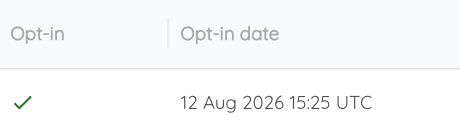
Only users who have opted in should be sent the marketing communications described in your consent statement, unless another legal exception applies.
You may still contact a user where necessary to respond to their conversation, provide requested information or handle an administrative or customer-service matter, provided the message does not include promotional content.
Note: It's not currently possible to manually edit a client's consent status on the client screen, but we're working on adding this. In the meantime, if you've already collected a client's consent another way, you'll need to manage that separately for now.
Using marketing consent with integrations
Marketing consent is included in the client information available through supported Coachvox integrations.
When sending client information to an email marketing or CRM platform through Zapier, you can use the marketing consent field to identify which users have opted in.
You are responsible for making sure users who have not opted in are not added to marketing lists where consent is required.
When someone withdraws consent
Users must be able to withdraw their marketing consent easily. Marketing emails should include a clear unsubscribe option.
When someone withdraws their consent, you must stop sending the marketing communications covered by it. You may retain a limited record of the withdrawal to make sure they are not accidentally subscribed again.
Further information
For more information, please take a read of the following:
- Linking your privacy statement
- Coachvox privacy policy
- Coachvox and GDPR
- ICO guidance on direct marketing
This article provides general information and is not legal advice. Privacy and marketing rules vary by country, so you should seek professional advice where needed.